| ID |
Date |
Author |
Type |
Category |
Subject |
|
670
|
Thu Jan 22 10:10:31 2026 |
Jon | Infrastructure | General | Lab floor plans |
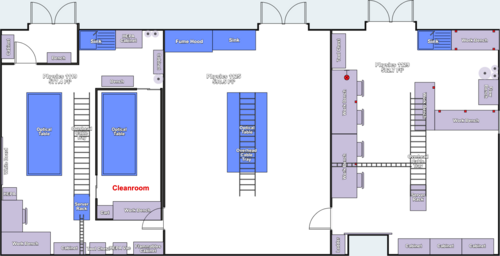
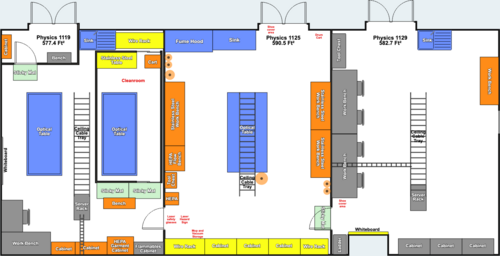
| Attached are the starting and final floor plans for the February 2026 expansion into the Physics 1125 lab. |
| Attachment 1: Pre-Feb-2026.png
|
|
| Attachment 2: Post-Feb-2026.png
|
|
|
676
|
Thu Feb 5 11:42:47 2026 |
Jon | Infrastructure | General | Lab floor plans |
[Audrey, Cece, Jon, Ma, Mary, Michael, Pooyan, Tyler, Shane]
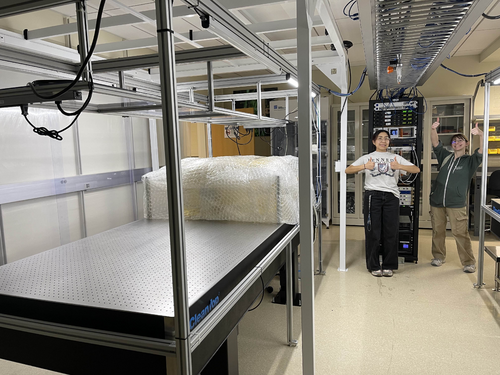
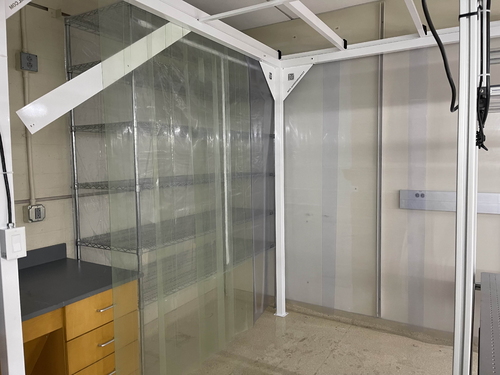
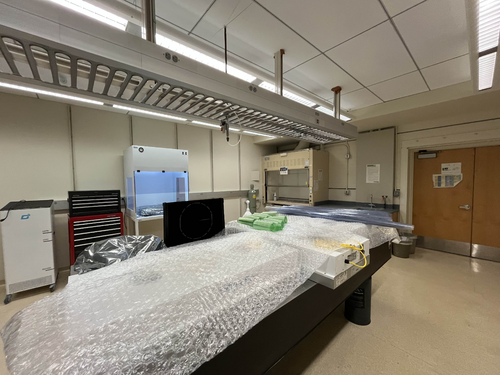
We have completed the preliminary reorganization of our Physics 1119 lab space. This includes:
- Moving all cabinets to their final positions
- Clearing out all equipment from the cleanroom in prep for HVAC work, and storing them in either the HEPA cabinet or double-bagging in regular storage.
- Moving all non-essential equipment into other lab spaces.
- Wrapping vacuum system and VLC for protection
- Removing all ceiling tiles and fans from the ceiling of the cleanroom
- Moving the cleanroom frame towards the front of the room.
Prepping the new clean-and-bake station in 1125 will begin within the next week, along with the construction of the stainless steel table planned to be put into the cleanroom.
| Quote: |
| Attached are the starting and final floor plans for the February 2026 expansion into the Physics 1125 lab. |
|
| Attachment 1: image.jpg
|
|
| Attachment 2: image_1.jpg
|
|
| Attachment 3: image_3.jpg
|
|
|
26
|
Fri Feb 10 16:34:45 2023 |
Huy Tuong Cao | Infrastructure | Clean & Bake | Nitrogen gas tank ready to use |
| Cao,
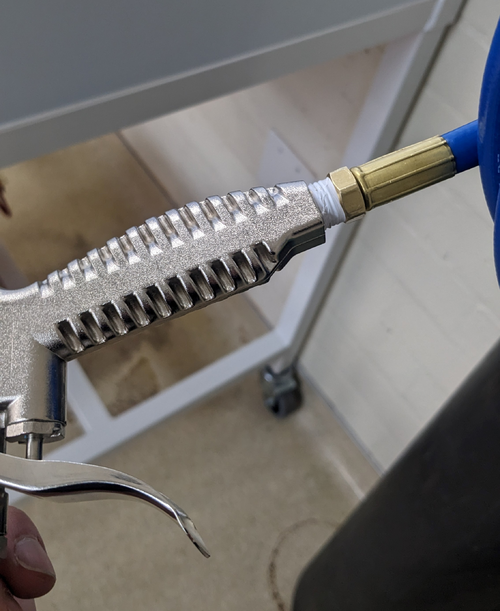
Today I fixed the final bit related to the nitrogen gas tank, which is to apply sealing tape to M-NPT connector of the hose to prevent
leakage (file: AirGunSealed.jpg)
After application of the tape, no audible leak can be heard from connection between the hose and the air gun.
The general operating procedure for the gas tank is as following:
- Turn the regulator (blue handle) anti-clockwise still it's loose
- Turn the valve on nitrogen as tank anti-clockwise, immediately the RHS meter of the regulator would jump to approx 2000 psi. This is the standard pressure for high pressure gas tank
- Turn the regulator clock-wise slowly until the pressure one the LHS meter face reads approx 60 psi. This is sufficient for drying parts with. At this point, the flow pressure still should register zero
- Press the trigger on the air gun, a high pressure air flow should come out and the flow meter should increase
- When finished, close the gas tank valve, turn the regulator anti-clockwise, then press the air gun trigger to release gas left in the hose/gun
|
| Attachment 1: AirGunSealed.jpg
|
|
|
704
|
Fri Apr 24 23:55:50 2026 |
Dhatri | Summary | Interferometer Simulations | |
[Sidd, Pooyan, Dhatri]
In the group meeting on 04/23/26, we discussed with Jon why we weren’t getting expected values for PRC Gain while running the current LLO model; specifically if there is mode mismatch. Worked more on this today.
- Looked at the mode mismatch using cavity_mismatch_table().
- Compared these finesse_ligo factory model mismatch values with those of the aLIGO katscript model.
- The latter does not have the cavity_mismatch_table(), looked at both models' mismatch values using cavity_mismatch().
- Ascertained that there is less mode mismatch in the katscript model (~10^-2) as compared to the factory model (~10^-6).
- Mismatch values are starkly different, not just for (PRC, XARM) but also for others like (OMC, XARM).
Is the issue with the locking procedure?
- Analysed the locking process for factory model and katscript model to find minor differences in the order.
- Tried applying the katscript locking function to the factory model and still seem to get the same results. (to recheck)
Further directions/steps:
- To compare radii of curvature of the optics in both models
- Check q parameter at PRM and assign it to the laser to run the model
- Generate powerup plots again and check against previous ones (with and without ring heater)
|
|
710
|
Tue May 5 14:13:45 2026 |
Dhatri | Summary | Interferometer Simulations | Mode mismatch |
[Pooyan, Tyler, Ceci, Dhatri]
Attached are the plots generated by running the newer code here for input power of 2W: run.py
PRG looks good now!
Note: For input power of 60W, the time evolution does not give accurate results; but this code is to be used for testing purposes without the powerup.
| Quote: |
[Sidd, Pooyan, Dhatri]
In the group meeting on 04/23/26, we discussed with Jon why we weren’t getting expected values for PRC Gain while running the current LLO model; specifically if there is mode mismatch. Worked more on this today.
- Looked at the mode mismatch using cavity_mismatch_table().
- Compared these finesse_ligo factory model mismatch values with those of the aLIGO katscript model.
- The latter does not have the cavity_mismatch_table(), looked at both models' mismatch values using cavity_mismatch().
- Ascertained that there is less mode mismatch in the katscript model (~10^-2) as compared to the factory model (~10^-6).
- Mismatch values are starkly different, not just for (PRC, XARM) but also for others like (OMC, XARM).
Is the issue with the locking procedure?
- Analysed the locking process for factory model and katscript model to find minor differences in the order.
- Tried applying the katscript locking function to the factory model and still seem to get the same results. (to recheck)
Further directions/steps:
- To compare radii of curvature of the optics in both models
- Check q parameter at PRM and assign it to the laser to run the model
- Generate powerup plots again and check against previous ones (with and without ring heater)
|
|
| Attachment 1: llo_power_up_1461976383.pdf
|

|
|
359
|
Mon Apr 8 14:57:41 2024 |
Cynthia, Pooyan | Update | Interferometer Simulations | performed cavity scans for O4 O5, and coupled cavity |
|
| Attachment 1: LIGO_update_week1.pdf
|

|
|
688
|
Thu Feb 26 20:25:10 2026 |
Cynthia Liang | Update | Interferometer Simulations | Point Absorber+Miscentering Simulation |
|
| Attachment 1: update_2_18_Merged.pdf
|

|
|
343
|
Tue Feb 27 09:06:29 2024 |
Cynthia | Update | Interferometer Simulations | cavity scan with higher order input laser |
| I performed a few cavity scan with the inputing laser with a different mode (not pure 00). For each laser I included a graph for just plotting the order with highest power (for example 1st order laser input the first plot only scanned for 1st order in that cavity), and I have also included a graph scanning for order 1-10. |
| Attachment 1: ligoPre_2_27.pdf
|

|
|
363
|
Mon Apr 22 15:06:33 2024 |
Cynthia | Update | Interferometer Simulations | cavity scan update |
| [Cynthia,Pooyan]
Completed some simulations injecting 0-10th order modes. Some graphs will be used for the poster after some further titles, axis, and range adjustments. |
| Attachment 1: LIGO_4_22.pdf
|

|
|
381
|
Mon Jun 24 14:28:51 2024 |
Cynthia | Update | Interferometer Simulations | SIS cavity with thermal effect |
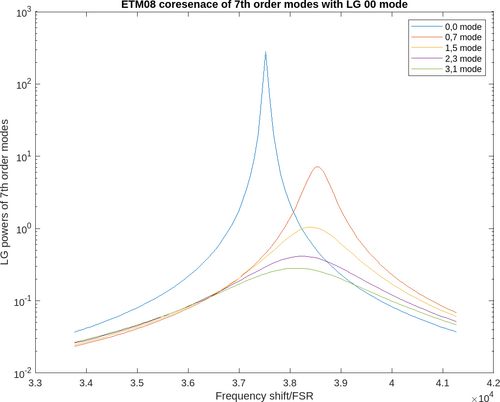
| tried to run a cavity scan with thermal deformation and ring heater for ITM04 ETM08 (aLIGO mirrors). Not sure about the accuracy of the graph as there is some commands that still need to verified. |
| Attachment 1: ETM08thermal.png
|
|
|
392
|
Mon Jul 1 15:19:42 2024 |
Cynthia | Update | Interferometer Simulations | O4 and O5 mirror cavity scans with thermal effect |
|
| Attachment 1: cavityScan_07_01.pdf
|

|
|
408
|
Mon Jul 15 15:44:52 2024 |
Cynthia | Update | Interferometer Simulations | performed cavity scans with thermal effects and ring heater |
|
| Attachment 1: cavity_scan_07_15.pdf
|

|
|
424
|
Mon Aug 12 17:09:04 2024 |
Cynthia | Update | Interferometer Simulations | O4 vs O5 cavity scans with ITM plume guess or ETM |
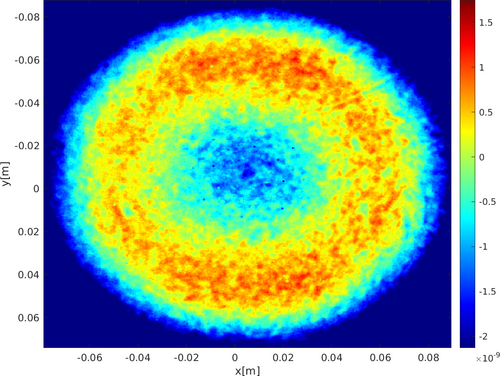
| So far the proposed solution for what to use for O5 ITM mirror for SIS simulations is either the plume guess file or using the O5 ETM mirror for ITM. I had ran a cavity scan for both of these possibilities and it seems like the results produced are fairly different. The next step is most likely moving on to adding the Frosti effects including both of the proposed possibilities, and before this, a few confirmations and verifications are needed using similar previous studies to make sure my code produce the right result. |
| Attachment 1: O5_plots_and_tables.pdf
|

|
| Attachment 2: O4_plots_and_tables.pdf
|

|
| Attachment 3: ETM12mapO5.png
|
|
| Attachment 4: Screenshot_2024-08-12_at_5.05.31_PM.png
|
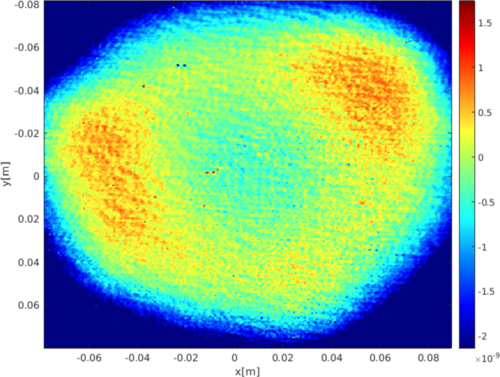
|
|
428
|
Mon Aug 26 14:42:04 2024 |
Cynthia | Update | Interferometer Simulations | current status on cavity scan with effects of FROSTI |
| I used the code and arm cavity model used for previous O5 study on mirrors and HOM (the pdf of the study and the result can be found at https://dcc.ligo.org/LIGO-G2100878), but it seems like the result I obtained is different from the study result. Since my cavity scans codes have a large portion of it relying on this code, I will have to go over the study result and the code to make sure there is no issue with that code itself first. There are also some other updates or issued encountered when I tried to plot the mirror maps with effects of FROSTI. |
| Attachment 1: LIGO_updates_8_26.pdf
|

|
|
443
|
Mon Sep 16 15:18:59 2024 |
Cynthia | Update | Interferometer Simulations | a breakdown of FROSTI and thermal effects and the resulting cavity scan |
|
| Attachment 1: ligo_update_9_16_(1).pdf
|
.png "ligo_update_9_16_(1).pdf")
|
|
446
|
Mon Sep 23 15:00:41 2024 |
Cynthia | Update | Interferometer Simulations | corrections on assumption for O5 coating |
| The document recording ETM07 and ETM08 coating (T2300093) was discussed:
the current plume files are not necessarily correct in a way that LIGO lab have tried to add it on uncoated ETM such as ETM07 and it does not match what the coated ETM07 would look like.
the plume should be added on top of the uncoated ETM instead of assuming an ideal ETM. According to Garilynn, the imperfection on uncoated ETM matters.
So far the possible ETM data used for O5, ETM 11,14,19, and 20 are all uncoated, and different ways could be used to predict the plume, including the plume data on LIGO dcc or subtract the uncoated data from the coated for O4 ETM and use that as another guessed plume. |
| Attachment 1: Uncoated_S1_ETM07-v2.pdf
|

|
|
587
|
Tue Jun 3 12:16:13 2025 |
Cynthia | Update | Interferometer Simulations | Point absorber simulation on radially averaged profile |
|
| Attachment 1: update_6_3.pdf
|

|
|
679
|
Thu Feb 5 13:34:13 2026 |
Cynthia | Update | Interferometer Simulations | Point absorber + miscentering simulation |
|
| Attachment 1: update2_5_(3).pdf
|
.png "update2_5_(3).pdf")
|
|
361
|
Mon Apr 15 15:25:10 2024 |
Cynthia | Update | Interferometer Simulations | progress on simulation so far |
|
| Attachment 1: LIGO_update_week3_(2).pdf
|
.png "LIGO_update_week3_(2).pdf")
|
|
374
|
Mon Jun 3 14:59:44 2024 |
Cynthia | Update | Interferometer Simulations | Created cavity scan with LG modes |
|
| Attachment 1: ligo_update_6_3.pdf
|

|
|
426
|
Mon Aug 19 07:11:55 2024 |
Cynthia | Update | Interferometer Simulations | cavity scans with FROSTI effects |
|
| Attachment 1: LIGO_update_8_19.pdf
|

|
|
454
|
Wed Oct 2 13:38:00 2024 |
Cynthia | Update | Interferometer Simulations | cavity scan with averaged O4 ETM coating as plume |
|
| Attachment 1: O5plumevsCoating.png
|
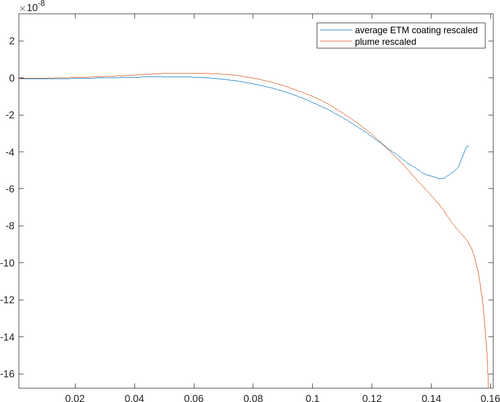
|
| Attachment 2: O5CoatAvgpt5.png
|
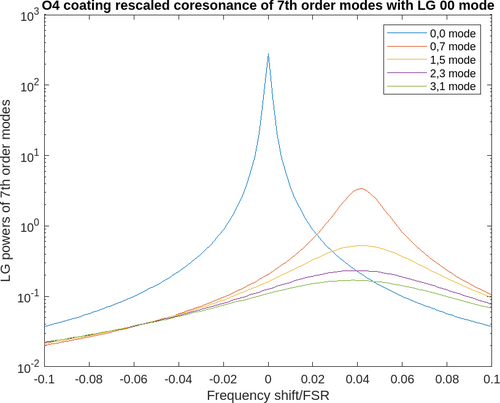
|
| Attachment 3: O5AVgcoatingFROSTIpt5.PNG
|
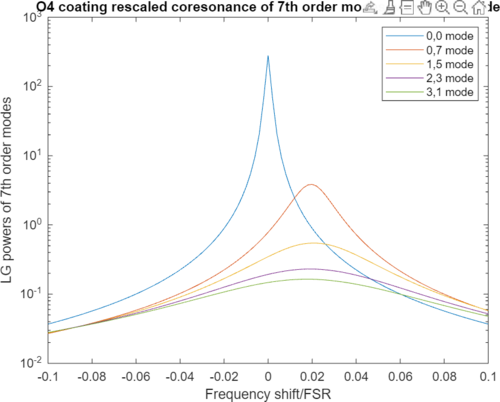
|
|
526
|
Tue Feb 25 10:56:25 2025 |
Cynthia | Update | Interferometer Simulations | mirror coating added for simulation rerun |
| I have tried to rerun the simulation on finesse after adding the mirror coating. The result has a large fluctuation in required input power vs arm power that is concerning. I am currently working on potentially resolve this issue and get a reasonable graph before I proceed to optimizing the thermal maps. |
| Attachment 1: updats_(3).pdf
|
.png "updats_(3).pdf")
|
|
530
|
Tue Mar 4 10:18:43 2025 |
Cynthia | Update | Interferometer Simulations | attempted to remove curvature and tilt for the coating |
|
| Attachment 1: 3_4_updates.pdf
|

|
|
540
|
Tue Mar 11 11:28:52 2025 |
Cynthia | Update | Interferometer Simulations | flattening mirror to study power discrepency |
|
| Attachment 1: updates_3_11_(1).pdf
|
.png "updates_3_11_(1).pdf")
|
|
554
|
Tue Apr 15 11:37:17 2025 |
Cynthia | Update | Interferometer Simulations | Finishing up mirror coating map step |
|
| Attachment 1: updates_4_15_2025.pdf
|

|
|
686
|
Thu Feb 19 12:34:18 2026 |
Cynthia | Update | Interferometer Simulations | Point absorber simulation |
|
| Attachment 1: update_2_18.pdf
|

|
|
692
|
Thu Mar 12 12:48:58 2026 |
Cynthia | Update | Interferometer Simulations | New Result of point absorber+miscentering |
|
| Attachment 1: Untitled_presentation_(1).pdf
|
.png "Untitled_presentation_(1).pdf")
|
|
697
|
Thu Apr 9 12:50:28 2026 |
Cynthia | Update | Interferometer Simulations | O5 Test mass |
| https://docs.google.com/presentation/d/1vJPZ9H_umgsZacCLgsqAUZWjn7-6l77np3E_YgaSy_M/edit?usp=sharing |
|
698
|
Thu Apr 16 12:53:30 2026 |
Cynthia | Update | Interferometer Simulations | O5 Test mass |
|
| Attachment 1: 4_16_update.pdf
|

|
|
703
|
Thu Apr 23 12:47:05 2026 |
Cynthia | Update | Interferometer Simulations | O5 Test mass |
|
| Attachment 1: 4_23_26.pdf
|

|
|
707
|
Thu Apr 30 13:23:55 2026 |
Cynthia | Update | Interferometer Simulations | O5 Test mass |
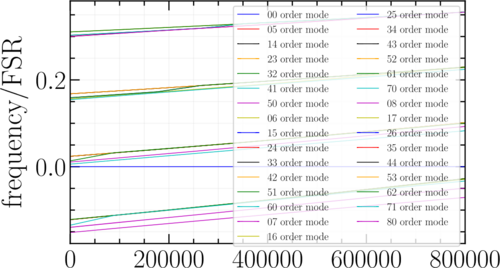
| frequency locations of 5-8th order mode across arm power of 0-800kW |
| Attachment 1: scan_5-8.png
|
|
|
711
|
Thu May 7 13:35:14 2026 |
Cynthia | Update | Interferometer Simulations | O5 Test mass |
|
| Attachment 1: Screenshot_2026-05-07_133453.png
|
|
|
712
|
Thu May 14 12:37:17 2026 |
Cynthia | Update | Measuring Noise in Interferometer | O5 Test mass design |
|
| Attachment 1: update_5_13.pdf
|

|
|
713
|
Thu May 14 13:42:57 2026 |
Cynthia | Update | Interferometer Simulations | less-roll-off coating |
|
| Attachment 1: e6caa8cf-2a96-49d8-a8b7-b84feab55404.png
|
|
|
714
|
Thu May 28 12:54:38 2026 |
Cynthia | Update | Interferometer Simulations | O5 Test mass |
|
| Attachment 1: 5_28_update_(1).pdf
|
.png "5_28_update_(1).pdf")
|
|
716
|
Thu Jun 4 13:30:46 2026 |
Cynthia | Update | Interferometer Simulations | O5 Test mass Presentation |
|
| Attachment 1: Nonspherical_polishing_profile_design_recommendation.pdf
|

|
|
723
|
Thu Jun 25 13:45:11 2026 |
Cynthia | Update | Interferometer Simulations | Poster Draft |
| https://docs.google.com/presentation/d/1tpYjs-gOfZgFFkffU0kv7rYKHu0xtfPyMZqF1qXHIOQ/edit?usp=sharing |
|
738
|
Thu Jul 16 13:14:26 2026 |
Cynthia | Update | Interferometer Simulations | LIGO pre-figuring team meeting summary |
| Pre-figuring meeting 7/14:
- the non-uniformity brought by annealing for ETM14 and 11 seems to be higher than expected, this meeting focused on discussing about annealing data for ETM014 and 11 : https://dcc-lho.ligo.org/LIGO-T2600213
-we will receive more data for these, since there are some residual power left in the data/plots shown in the meeting because of the reference sphere, and the exact reference sphere radius is unclear
- reviewed the uniformity plot for HR ETM with TiGe coating again: https://dcc-lho.ligo.org/LIGO-T2600277
- not a lot of updates for ring heater: 40W delivered. Currently lock with 1.5W per segment on ETMy at LHO
- slides for HOM study for 250mW biased profile:
https://docs.google.com/presentation/d/1BWh_skxkCXBu_e_QkXkUs9CdvFIryu7H_jfpCgOenNg/edit?usp=sharing
https://docs.google.com/presentation/d/174XVLLpNpNgnL0uV-dSp6MO5pmZ9Yvnouf8V0LA2zE8/edit?usp=sharing
However, we did not focus on any surface profile related topics in the meeting so it was not presented |
|
742
|
Wed Jul 29 23:56:29 2026 |
Cynthia | Update | Interferometer Simulations | Pre-figuring meeting 7/28 summery |
| Pre-figuring meeting 7/14:
- using the change in surface from annealing, Hiro did some study on HOM scattering/losses from just this surface (shown in the email attachmnent O5testmass.pdf. We together went over these results again.
    - ETM11 annealing data to be used: https://dcc.ligo.org/T2600214
- more annealing data: https://docs.google.com/spreadsheets/d/1E138nNZk5b1yPm0g5jmwv_Z9FD9ArQtnlAk1d_1Ce1U/edit?usp=sharing
- Mostly discussed what to do about this annealing surface change when we are polishing the mirror: The idea now is to polish around it (the polish will include the negative of those surface deformation), but it's better to express it in an analytical form to the manufactuer. We try to explore if it is feasible to represent this surface introduced by annealing as Zernike coefficients
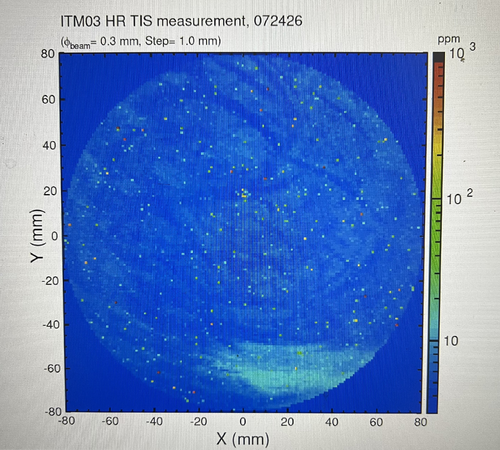
- New ITM meausrement shown as attachment below
- Kevin and Evan will take this surface after annealing as part of their error analysis for their 250mW biased surface profile in the furture, meanwhile I tried to see how will the HOM and PRG conditions change if we don't do anything about this surface, using same analysis we did before:
-
https://docs.google.com/presentation/d/1nkyOmivyaPKkvbgf3TPBjgV2YcgRum7N1EvapgcIMaA/edit?slide=id.p#slide=id.p
|
| Attachment 1: IMG_6504.jpg
|
|
|
751
|
Thu Sep 10 13:05:47 2026 |
Cynthia | Update | Interferometer Simulations | Beam Miscentering PRG Distribution |
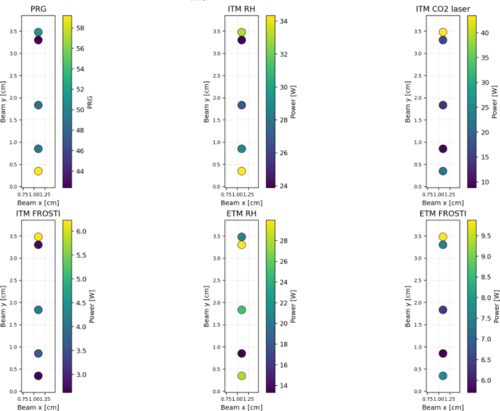
| generated the global optimum PRG, thermal actuator powers for FROSTI Dual for a few points (only 5 y beam position finished running so far but the plot can be generated actively as each new beam position finished running) with the particle swarm code. Only beam is moved around, no point absorbers.
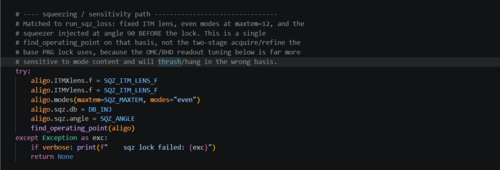
Unsure if the modes can be kept "even" once point absorber and mis-centering is introduced when locking the interferometer in the simulation when simulating quantum noise/squeezing. So The quantum noise distribution is for now still running but running all modes (0-12) |
| Attachment 1: PRG_distribution.png
|
|
| Attachment 2: qn_code.png
|
|
|
635
|
Tue Aug 26 12:45:41 2025 |
Christina, Ma, Tyler | Update | CDS | RIN Update |
| Slides |
|
600
|
Fri Jun 27 15:38:22 2025 |
Christina | Update | TCS | FROSTI Reconstruction |
[Tyler, Ma, Christina, Luke]
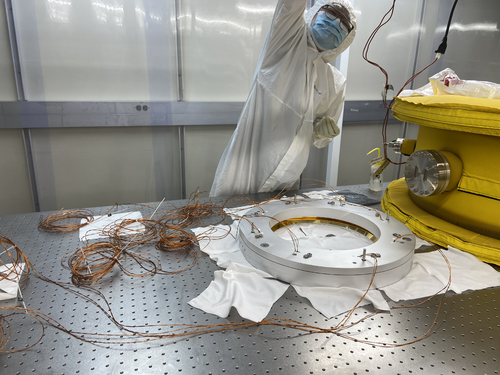
We threaded the wiring of the heater elements through the reflective surfaces and were able to attach each piece with the Macor spacers and connect both sides. We used the guide rails and screws to ensure proper alignment. The only necessary step left is to add the additional external screws for the reconstruction. |
| Attachment 1: IMG_4009.png
|
|
|
601
|
Tue Jul 1 11:04:00 2025 |
Christina | Update | TCS | FROSTI Reconstruction II |
[Ma, Tyler, Christina]
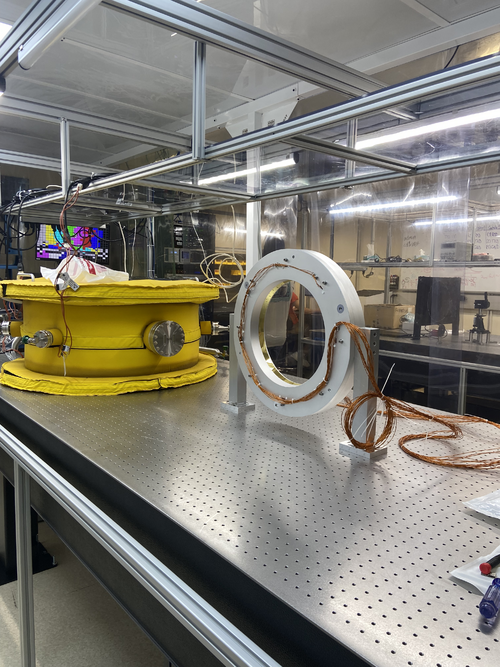
Finished external reconstruction of the FROSTI by installing all the pins to the 2 DB 25 connectors. To ensure everything was operating correctly, we did electrical testing by testing continuity and by checking each of the heater elements' RTD and power resistance values and comparing them to what was tabulated in January. Additionally, we organized the wires and added the stands. |
| Attachment 1: IMG_4042.png
|
|
|
604
|
Mon Jul 7 16:39:18 2025 |
Christina | Update | TCS | Pomona Box Drawings |
Below are the drawings for the pomona box modifications |
| Attachment 1: pbdwg1.PDF
|

|
| Attachment 2: pbdwg2.pdf
|

|
|
608
|
Thu Jul 10 16:41:18 2025 |
Christina | Update | TCS | |
[Christina, Ma, Tyler]
Pomona Box completed and is now on the server rack in 1119. Additionally, the photodetectors were connected to the box and set up in front of the heater elements. |
| Attachment 1: 2994921113032912040.JPG
|
|
| Attachment 2: 4717009101108174053.JPG
|
|
| Attachment 3: 5782646701589802125.JPG
|
|
|
611
|
Tue Jul 15 10:40:23 2025 |
Christina | Update | TCS | |
[Christina, Ma, Tyler]
Yesterday, Ma and I started taking data for the PSD/CSD measurements while the photodetectors and one of the heater elements are on (8) and are using the Red Pitaya to compare it to the data we took for the same measurements on the CyMAC. It will be finished Wednesday morning, and then we plan on starting to take additional recordings in order to conduct the same type of comparison for the dark noise measurements. |
| Attachment 1: rpon.png
|
|
|
614
|
Tue Jul 15 13:13:48 2025 |
Christina | Update | TCS | Photodetector optical post assembly |
|
| Attachment 1: pdreassembly.png
|
|
|
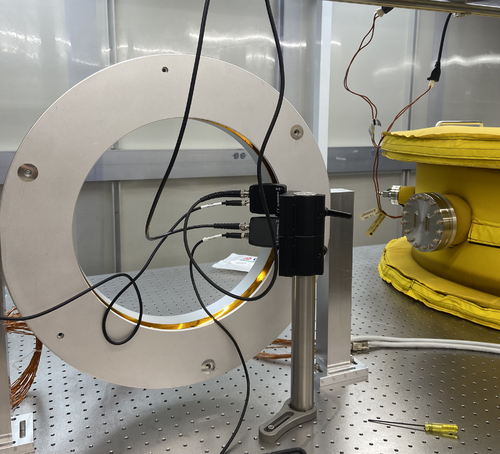
615
|
Tue Jul 22 12:20:29 2025 |
Christina | Update | TCS | |
[Ma, Christina, Tyler]
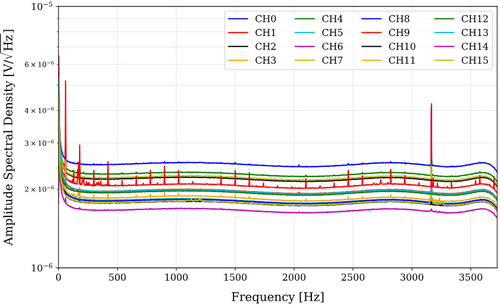
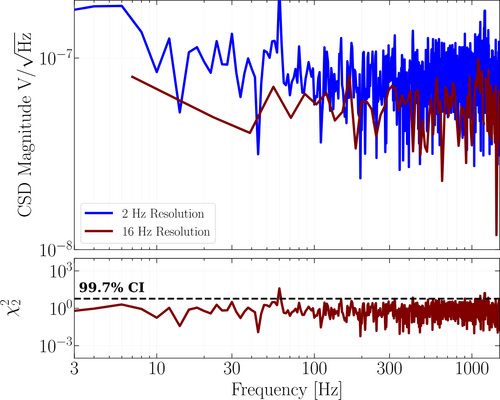
Figure 1 shows the following PSDs for channels 0-15 from the 14 hour test. Figure 2 shows the reduced chi squared and CSD plots for both the 2 Hz and 16 Hz resolutions.
|
| Attachment 1: PSDch0-15.png
|
|
| Attachment 2: CSD2hz_16hz.png
|
|
|
619
|
Tue Jul 29 12:30:00 2025 |
Christina | Update | TCS | 260 hour ADC update |
[Ma, Christina, Tyler]
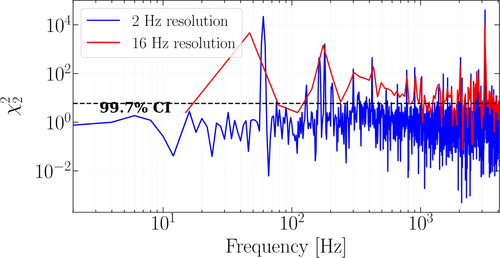
ADC CyMAC 260 hr, 8192Hz sampling rate channels V3 and Vref6 |
| Attachment 1: CSD_06_28_25_270hr.png
|
|