| ID |
Date |
Author |
Type |
Category |
Subject |
|
330
|
Tue Feb 20 08:01:30 2024 |
Jon | Infrastructure | General | Power and network equipment installed in 1129 rack |
| [Jon, Tyler, Pooyan, Luis, Luke, Peter]
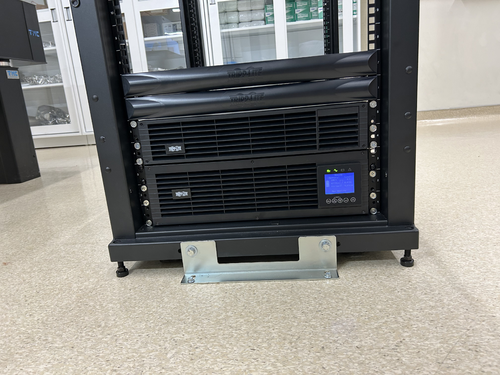
On Thursday we installed the power conditioning/distribution equipment and networking equipment in the new 1129 rack. The hardware is identical to the setup in the 1119 rack and includes:
- Tripp Lite SU5KRT3UTF - 208V, 5kVA on-line UPS with 120V transformer
- CyberPower PDU20M2F12R - metered power distribution unit, (14) NEMA 5-20R
- Ubiquiti USW-Pro-48 - 48 port 10Gbps network switch
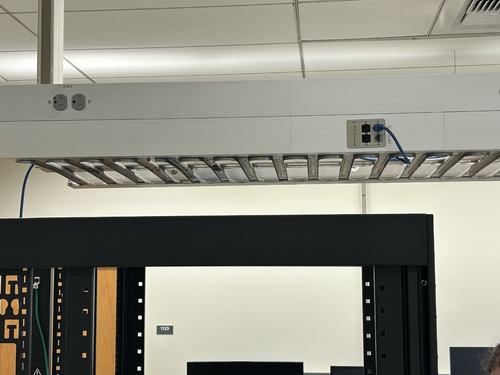
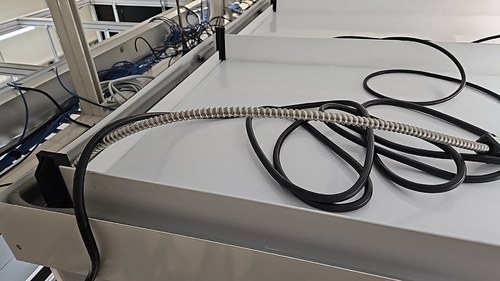
The UPS is connected to a 208V NEMA 6-30R outlet in the overhead cable tray, which is on the building's "standby" (backup power) circuit. An 8-ft L6-30 extension cord has been ordered to permanently run the power cable through the cable tray.
The network switch will be connected to a Cat6 cable that was recently run by ITS from the 1119 rack, allowing the lab's LAN to be extended into 1129. This Ethernet link remains to be tested.
| Quote: |
Server Rack Installation
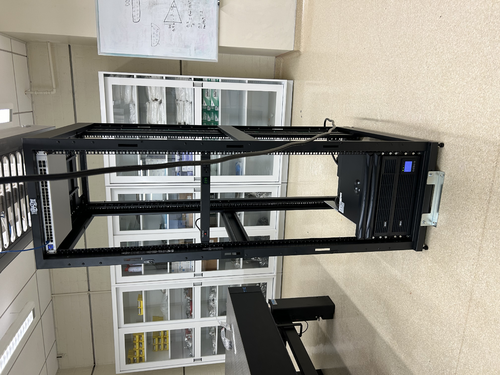
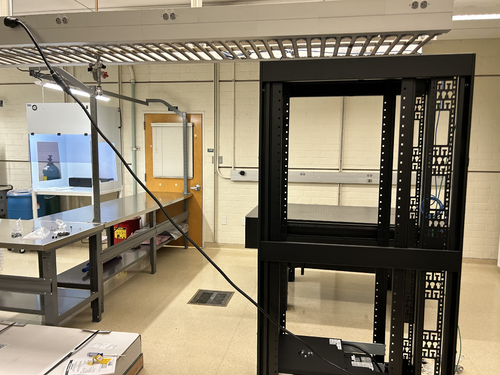
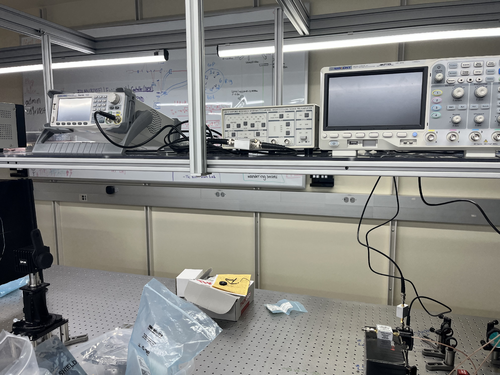
A new Tripp Lite 42U open-frame rack was laid in place in 1129 and anchored to the floor (see attachment 1). This rack will house all of our general-purpose and simulation computers, which will be relocated from the 1119 rack at a later time.
|
|
| Attachment 1: IMG_0924.jpeg
|
|
| Attachment 2: IMG_0925.jpeg
|
|
| Attachment 3: IMG_0921.jpeg
|
|
| Attachment 4: IMG_0922.jpeg
|
|
|
723
|
Thu Jun 25 13:45:11 2026 |
Cynthia | Update | Interferometer Simulations | Poster Draft |
| https://docs.google.com/presentation/d/1tpYjs-gOfZgFFkffU0kv7rYKHu0xtfPyMZqF1qXHIOQ/edit?usp=sharing |
|
604
|
Mon Jul 7 16:39:18 2025 |
Christina | Update | TCS | Pomona Box Drawings |
Below are the drawings for the pomona box modifications |
| Attachment 1: pbdwg1.PDF
|

|
| Attachment 2: pbdwg2.pdf
|

|
|
587
|
Tue Jun 3 12:16:13 2025 |
Cynthia | Update | Interferometer Simulations | Point absorber simulation on radially averaged profile |
|
| Attachment 1: update_6_3.pdf
|

|
|
686
|
Thu Feb 19 12:34:18 2026 |
Cynthia | Update | Interferometer Simulations | Point absorber simulation |
|
| Attachment 1: update_2_18.pdf
|

|
|
679
|
Thu Feb 5 13:34:13 2026 |
Cynthia | Update | Interferometer Simulations | Point absorber + miscentering simulation |
|
| Attachment 1: update2_5_(3).pdf
|
.png "update2_5_(3).pdf")
|
|
688
|
Thu Feb 26 20:25:10 2026 |
Cynthia Liang | Update | Interferometer Simulations | Point Absorber+Miscentering Simulation |
|
| Attachment 1: update_2_18_Merged.pdf
|

|
|
165
|
Tue Jul 18 16:35:06 2023 |
Pamella | Update | FLIR | Plot-Data with the new configuration without the mask and reflector. |
[Pamella]
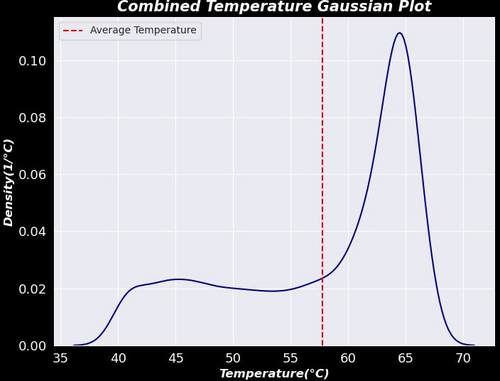
- I was able to plot the first graph for a result between the six different positions on the screen, for now we can see the behavior of the heater temperature in a Gaussian graph with combination data between the six files.
- To do: Tyler gave me some ideas today to improve the plot. So I'm going to change the code to have insulation on the values for just the heater ("insulation") and I'm going to plot after this insulation data as well I'm going to get more data and compare with more data for the same position.
- I was using the data than I got last week and I shared on Elog (151) and we can see on this quote
| Quote: |
| [Pamella]
I started collecting data by moving the camera FLIR and covering all six positions on the screen (2x3). I was looking and taking snaps for more than one hour and a half. I'll repeat this one more time to make sure we have enough data to do analysis.
I attached snap data below. This images is processed on python code. |
|
| Attachment 1: Gauss.plot.jpeg
|
|
|
431
|
Thu Aug 29 16:39:34 2024 |
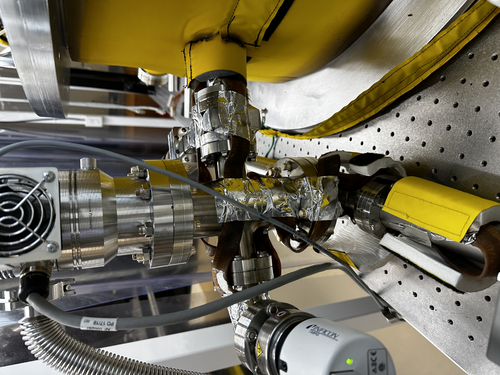
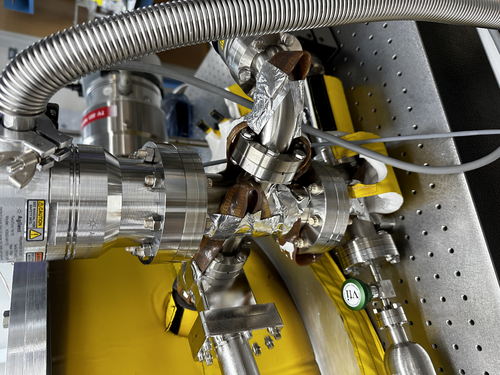
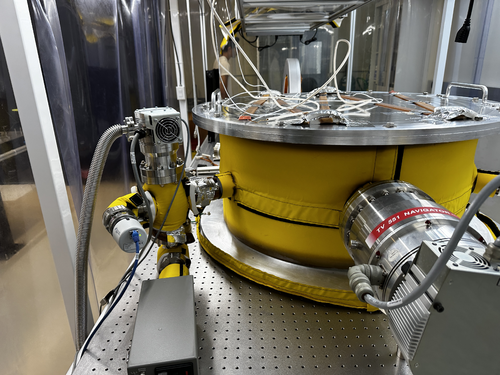
Luke | Update | VAC | Photos of heater tape |
|
| Attachment 1: IMG_2052.jpeg
|
|
| Attachment 2: IMG_2051.jpeg
|
|
| Attachment 3: IMG_2048.jpeg
|
|
| Attachment 4: IMG_2047.jpeg
|
|
| Attachment 5: IMG_2046.jpeg
|
|
| Attachment 6: IMG_2044.jpeg
|
|
|
560
|
Tue Apr 22 13:00:04 2025 |
Nathan | Update | VLC Update | Photodiode signal check and additional signal check due to 20Mhz signal and amplifier |
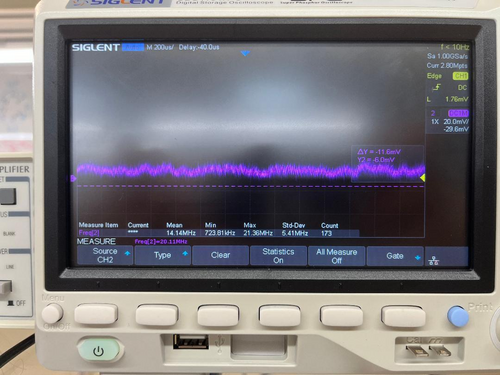
| In general, photodiode was able to achieve signal. Below are the voltage signals and frequency measurements of the photodiode with the dc bias and amplifier connected to the EOM (Vpp = 2mV for first and Vpp= 1 for second). Also I need assistance in using the PZT driver. |
| Attachment 1: thumbnail_(8)_(1).jpg
|
_(1).jpg.png "thumbnail_(8)_(1).jpg")
|
| Attachment 2: vpp.jpg
|
|
|
614
|
Tue Jul 15 13:13:48 2025 |
Christina | Update | TCS | Photodetector optical post assembly |
|
| Attachment 1: pdreassembly.png
|
|
|
94
|
Tue May 9 15:49:20 2023 |
Jon | Infrastructure | VAC | Permanent cable routing |
Today I brought in a fresh supply of zip ties (we now have 1500 in the tool chest) and used them to permanentize the cable routing for the gauges, pumps, and RGA.
I also brought and installed a 3-foot 15A extension cable for powering the scroll pump. Installing the cable required shutting down the pumps, which I did and then reverted via the following procedure:
- Close the 4.5" gate valve, 2.75" gate valve, and the bypass line angle valve.
- Shut down the turbo pump.
- Shut down the scroll pump.
- Unplug the scroll pump and install the extension cable.
- Power on the scroll pump.
- Power on the turbo pump.
- Open all three valves.
Incidentally, before I started, I noticed that the pressure in the main volume had reached 7E-7 torr, which is lower than the pressures seen last week. The system quickly returned to this pressure after I restarted the pumps. |
|
691
|
Wed Mar 11 19:38:21 2026 |
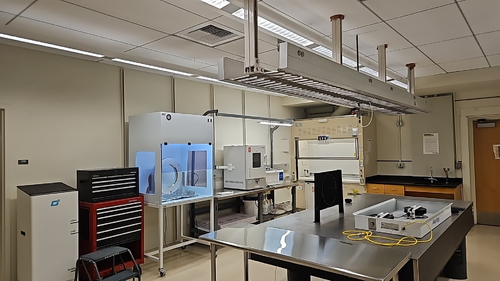
Pooyan | Infrastructure | Cleanroom | Parts and things to get after the cleanroom move |
- concrete Caulk to fill the drill holes in 1119
- Example [Pooyan: I have a caulk gun and silicon caulk at home, if needed.]
- Water hose for the washer in 1125
- 1/2" diameter
- almost 8 Ft
- Exhaust for the oven in 1125
- Question: not sure which way we want the exhaust to go. Measurements depend on the path.
- Oven exhaust to the ceiling vertical distance: 47"
- Oven exhaust to the ceiling exhaust distance: 6 ft
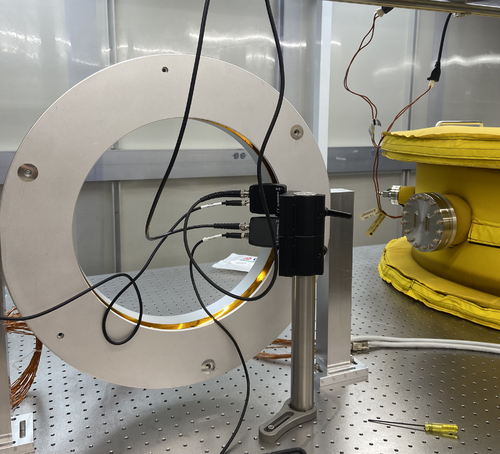
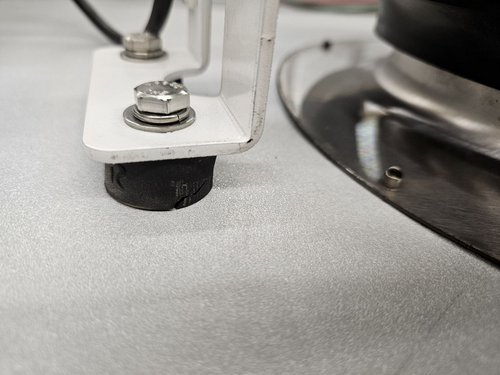
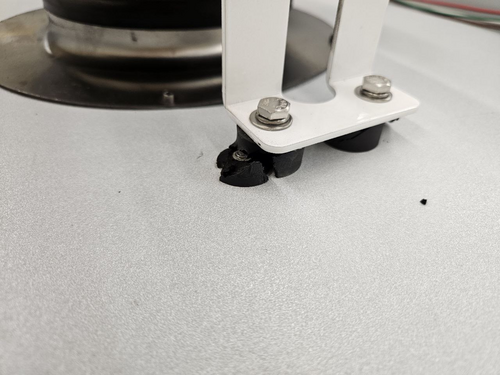
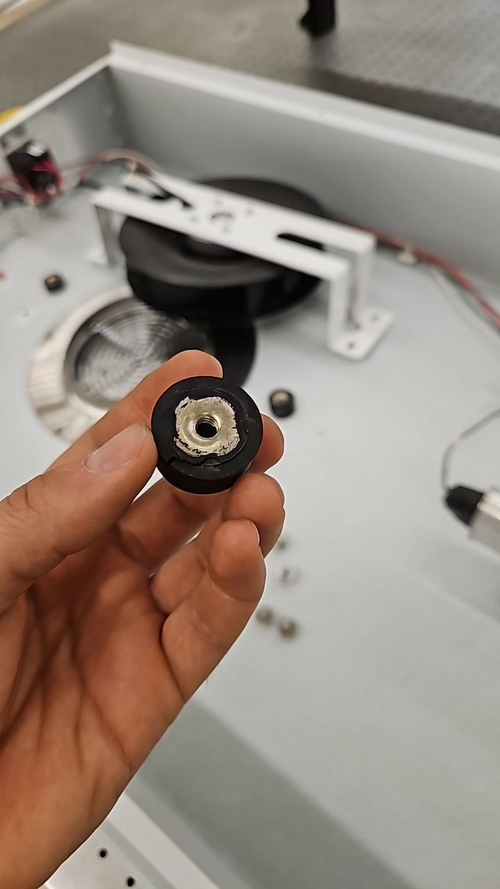
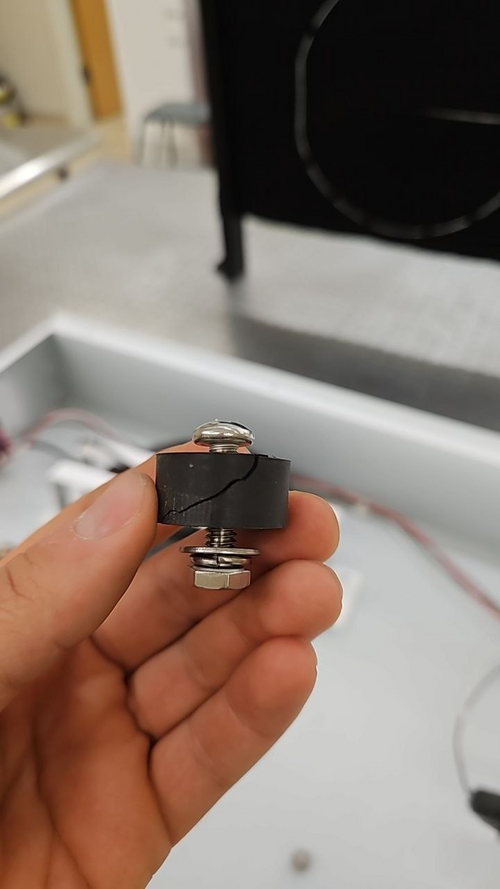
- Rubber vibration dampers for the cleanroom fans (see the first 4 pictures)
- 25 mm diameter, 13 mm height, ~5-6 mm thread, 6 mm deep
- Example (This is the male version. We need one with female on both sides)
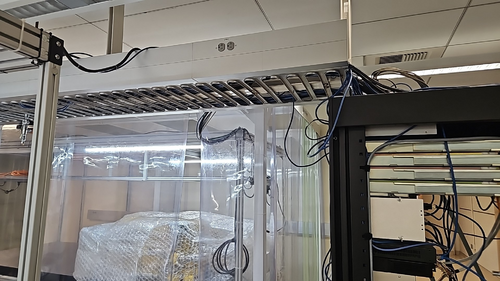
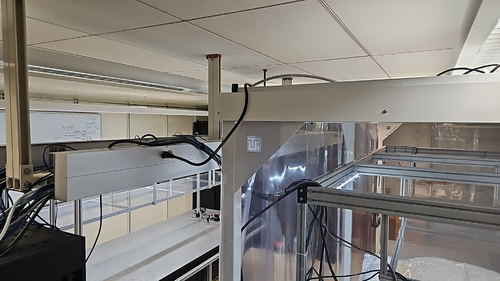
- Cabling conduit from the cable tray to the optical table frame (through the cleanroom ceiling)
- Wire cable tray for 1125
- ~10 Ft, exactly similar to the one already installed in 1129
|
| Attachment 1: photo_2026-03-12_10-33-02.jpg
|
|
| Attachment 2: photo_2026-03-12_10-32-57.jpg
|
|
| Attachment 3: photo_2026-03-12_10-57-16.jpg
|
|
| Attachment 4: photo_2026-03-12_10-57-21.jpg
|
|
| Attachment 5: photo_2026-03-12_10-57-25.jpg
|
|
| Attachment 6: photo_2026-03-12_10-57-28.jpg
|
|
| Attachment 7: photo_2026-03-12_10-57-32.jpg
|
|
| Attachment 8: photo_2026-03-12_10-57-36.jpg
|
|
|
12
|
Mon Nov 28 18:10:23 2022 |
shane | Update | ELOG | Particle counts in the clean room |
| Particle count stats for the clean room Nov 28, 2022:
Took 10 sample runs in each of 5 regions in the clean room (5 runs per region with a person inside the clean room for the measurement, and 5 runs per region without anyone in the clean room for the measurement), for a total of 50 samples taken. Sample time was 60 seconds. Overall clean room average particle count for the size ranges are as follows:
0.3 micrometers- 3405.76 (room occupied), 974.92 (room empty)
0.5 micrometers- 409.72 (room occupied), 409.72 (room empty)
1.0 micrometers- 1102.2 (room occupied), 282.6 (room empty)
2.5 micrometers- 692.32 (room occupied), 183.68 (room empty)
4.0 micrometers- 254.28 (room occupied), 84.72 (room empty)
5.0 micrometers- 141.24 (room occupied), 84.72 (room empty)
7.0 micrometers- 56.48 (room occupied), 84.72 (room empty)
10.0 micrometers- 42.36 (room occupied, 42.36 (room empty)
More statistics (including individual stats on the 5 regions within the clean room) attached. |
| Attachment 1: clean_room_particle_counts_11_28_-_Sheet1.pdf
|

|
|
64
|
Tue Apr 4 16:52:08 2023 |
Jon | Update | Cleanroom | Particle counter docking station |
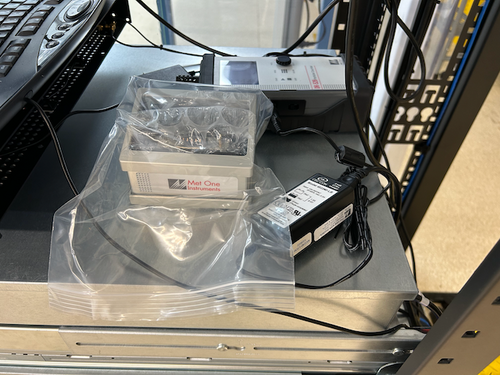
| Due to the problems we have encountered trying to serially communicate directly with the Met One DR-528 particle counter, I went ahead and ordered the add-on communications/charging dock. The dock "ethernetizes" the serial communications by wrapping them in TCP packets and transmitting them over the lab network. This will allow our Python code to communicate using the standard Internet sockets package, rather than PySerial, PyNut, etc.
the docking station arrived today and I delivered it to the lab. I left it laying next to the particle counter in the electronics rack. |
| Attachment 1: Met_One_Dock.png
|
|
|
71
|
Wed Apr 12 16:17:50 2023 |
shane | Update | General | Particle Counter moved |
| With the added height of the new docking station, the particle counter no longer fits under the Windows monitor in the electronics rack and has been moved to the desk in the corner of the lab. |
| Attachment 1: IMG_6693.HEIC
|
|
235
|
Mon Oct 9 11:29:37 2023 |
Tyler | Update | Electronics | PSD/CSD Plot Updates |
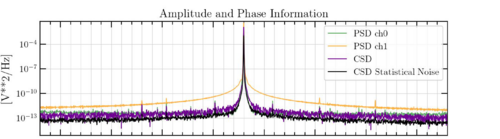
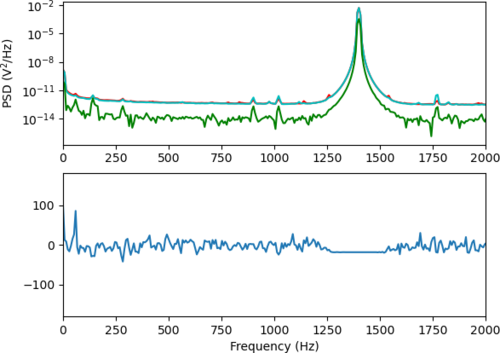
| Continuing from Sophia's SURF Project this summer: Plotting the Power-Spectral Densities (PSDs) and Cross-Spectral Densities of two signals.
A continued issue that has been observed in the plots is the random "jump" of one PSD curves. Below, a 1.4 kHz signal is driven with a magnitude of 0.7 Vpp, and connected to the two output ports of the Red Pitaya via an SMC T-Adapter. At the moment, I anticipate that this bug might have something to do with the Real-Time GUI code being used, since this hasn't been observed when running the calculations without it (see below). |
| Attachment 1: Screenshot_2023-10-09_at_11.20.25_AM.png
|
|
| Attachment 2: welch_csd-2.png
|
|
|
724
|
Thu Jul 2 11:09:09 2026 |
Cece Ochoa | Update | Inventory | PPE/Cleaning Supplies Inventory |
| [Shane, Cece]
Shane has made a Google Form to take inventory of PPE and cleaning supplies.
Additionally, she has made a form for purchase order requests.
Please use the first form to take inventory when NEW supplies arrive, and in future cleanings use the form to take inventory so we can have an accurate count of what is in the lab.
I have also made an optics inventory form that will update the previous optics inventory spreadsheet. |
|
536
|
Mon Mar 10 21:13:12 2025 |
Nathan | Update | VLC Update | PDH Lock Progress and Next Steps |
| Progress update: Photodiode is set up, need to set up DC bias tee, EOM has 400-600nm wavelength range with a resonance frequency of 0.1-100MHz. Additionally need to connect the DC bias to SR560, put it in low pass, then connect to the function generator and connect it to oscilloscope to observe. Once everything looks good and working, need to connect the driver and we can start actuating on the cavity ETM. |
| Attachment 1: thumbnail_(2).jfif
|
| Attachment 2: thumbnail_(4).jfif
|
| Attachment 3: thumbnail_(5).jfif
|
| Attachment 4: Visible_Light_Optical_Cavity_(2).pdf
|
.png "Visible_Light_Optical_Cavity_(2).pdf")
|
|
551
|
Tue Apr 8 20:04:35 2025 |
Nathan | Update | VLC Update | PDH Lock Progress |
| Connected the DC bias and mixer. Need to connect signal generator now to RF Amp and mixer, and also need to connect power supply. After that will see if I can get a detection on the oscilloscope and if so will set up the driver. [Photos attached] |
| Attachment 1: IMG_5450.jpeg
|
|
| Attachment 2: IMG_5449.jpeg
|
|
|
39
|
Wed Mar 1 21:27:20 2023 |
Jon | Infrastructure | Cleanroom | Over-table shelf height raised |
Jon, Cao
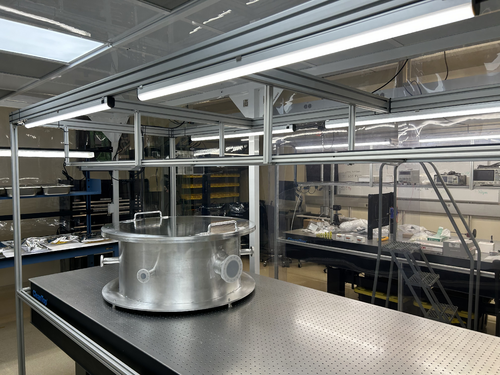
Today we raised the height of the shelf overhanging the cleanroom laser table by 8 inches. This was done to create more vertical clearance between the top-loading vacuum chamber and the bottom of the shelf. The added clearance should make both removing the chamber lid and inserting large parts easier.
The procedure required unmounting the shelf and removing all eight vertical support posts (1" x 1" x 18.5" pieces of 80/20 unistrut). The support posts were taken to the machine shop and cut, retapped, and cleaned (coarsely, with IPA wipes) prior to reinstallation. We took care to minimize the contamination introduced into the cleanroom, but some amount of particulate from disturbing the shelf was unavoidable.
This work is completed, and the cleanroom is now ready for final cleaning (HEPA vac, mopping, and wiping down of all surfaces including the softwalls). |
| Attachment 1: cleanroom-shelf.jpg
|
|
|
16
|
Mon Jan 23 17:26:15 2023 |
Peter Carney | Update | General | Oven cleaning |
| Aiden and Cao
Turned on the oven to 120 deg C for 12 hours. After 12 hours, put it at 200 deg C for 48 hours. |
|
17
|
Thu Jan 26 18:58:25 2023 |
Aiden | Update | General | Oven Heating |
| Aiden cleaned the oven with methanol again and set the oven to 260 degC for 12 hours. |
|
722
|
Thu Jun 25 13:21:31 2026 |
Cece | Update | Inventory | Optics Inventory Update |
| [Shane, Ma, Cece]
Updated optics inventory here.
Changes made: removed thrown out optics from sheet, added new optics found during Ma and Shane's cleaning, updated optics location (now all in 1119 optical cabinets, mostly in labeled yellow bins). |
|
717
|
Mon Jun 15 22:30:09 2026 |
Cece Ochoa | Infrastructure | Inventory | Optics Inventory |
| Spreadsheet of all tabletop optical parts in 1129 (Cabinet 1) linked here
Note that a couple of the optical posts still need to be measured for their diameters. Images are located in a Google Folder and linked on the spreadsheet so to view them you have to go to the Google Sheet. |
| Attachment 1: Optics_Inventory_(1).xlsx
|
| Attachment 2: Optics_Inventory_-_Sheet1.pdf
|

|
|
338
|
Fri Feb 23 18:03:27 2024 |
Tyler | Update | FLIR | Optical Test Setup in Cleanroom |
| [Tyler, Xuesi]
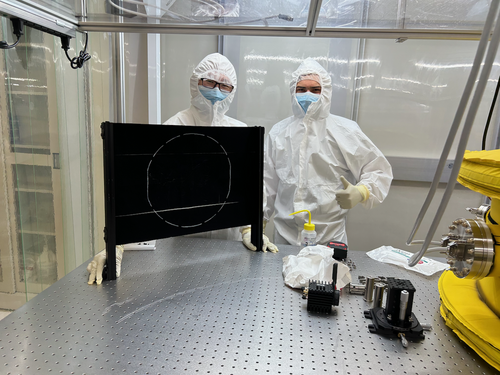
The FLIR and test mass stand-in have been transferred into the cleanroom. A software test will be run as soon as we get an ethernet cable long enough to reach into the cleanroom where the camera is set up. Once this is finished, the FLIR will be moved aside for construction of the FROSTI! When completed, the camera will be placed back into position for in-air optical testing.
|
| Attachment 1: IMG_0941.png
|
|
|
9
|
Tue Jul 26 14:10:35 2022 |
Cassidy | Update | Cameras | Optical Post Replacement and Realignment |
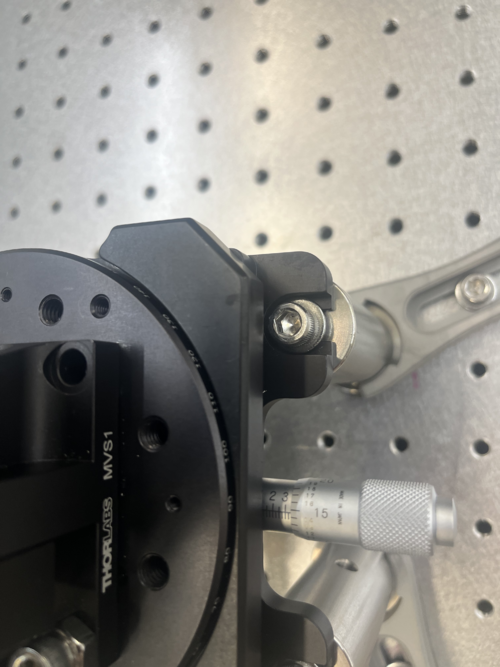
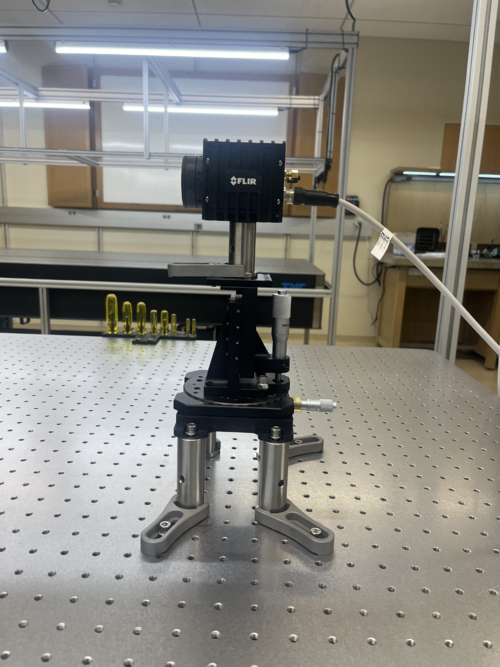
| Today I replaced the 3" optical post that the camera rests on with a 2" optical post in order for the screen to correctly fill out the camera's FOV. The 3" post is now in the glass optics cabinet next to the FLIR camera configuration box, wrapped in the protective materials from the 2" post for safekeeping.
There were no issues with the physical replacement of the post, except that the fork clamp on the post needs to be on one of the perpendicular, not diagonal, axes in order to be secure. I chose the front axis (towards the screen) as before in order to easily access the alignment knobs.
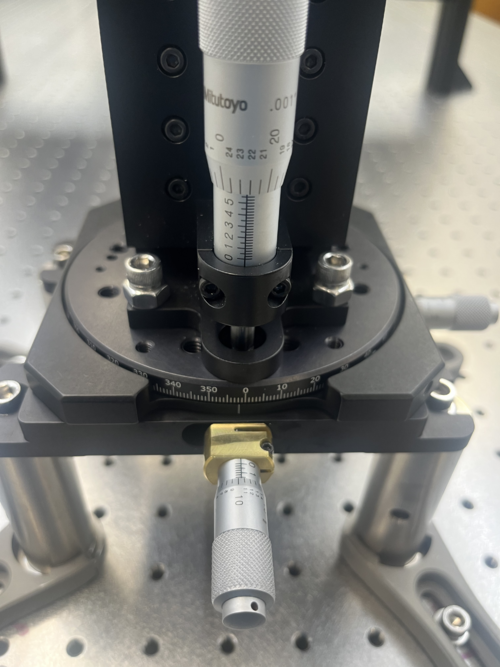
To align, I followed the same process as last time except for a more purposeful original rough alignment. For alignment purposes, the visual camera was used. For the first rough alignment, I pulled the camera as far back as possible on the x axis (with the z axis roughly centered), then moved the entire stage setup back until I could just see both the top and bottom edge of the screen. Then, I set the z-axis to an extreme in order to use the edge of the screen to align the rotational and y-axis pieces for the fine alignment.
For the fine alignment, starting with the z and x axis at extremes, I began by aligning the rotational axis. To do this, I used the gaps between the top of the screen and the camera window on the far left and right of the image. When these gaps were equal I knew the rotation was adequately set. Then, I set the y-axis so that the pattern was centered. If the gaps were no longer even, I redid the rotation alignment and ditto with the y axis until both were set. This resulted in a rotation of about two degrees and a y axis at just under 3.5.
To set the z and x axis, I centered the z-axis using the top and bottom of the screen, which should both be visible if the rough alignment was done correctly. Then, I adjusted the x axis by pushing it forward until the top and bottom of the screen were just out of the frame. As with the rotational and y-axis, I iteratively fine tuned the x and z axis until both the image was centered in the z axis and only the screen was in view. This resulted in a z-axis value of just over 5.5 and an x axis value of nearly 1.75.
Pictures are included of all alignment knobs and the new post/stage setup! |
| Attachment 1: YAxisAlignment.png
|
|
| Attachment 2: XRotZAlignment.png
|
|
| Attachment 3: NewOpticalPost.png
|
|
|
527
|
Thu Feb 27 18:22:21 2025 |
Shane | Update | CDS | Ongoing work in server rack and desk area (1119) |
| As part of the vacuum communications debugging process, there is ongoing work in the server rack and desk area in 1119. Please be careful not to move any of the materials left out in the server rack or on the work bench. |
|
650
|
Tue Sep 30 12:51:23 2025 |
Tyler | Update | TCS | O6 RH Update 09/30/2025 |
| Slides |
|
636
|
Tue Aug 26 13:09:03 2025 |
Tyler | Update | TCS | O6 RH Update |
| [Tyler]
Below are slides giving an update on RH O6 design progress.
Slides |
|
712
|
Thu May 14 12:37:17 2026 |
Cynthia | Update | Measuring Noise in Interferometer | O5 Test mass design |
|
| Attachment 1: update_5_13.pdf
|

|
|
716
|
Thu Jun 4 13:30:46 2026 |
Cynthia | Update | Interferometer Simulations | O5 Test mass Presentation |
|
| Attachment 1: Nonspherical_polishing_profile_design_recommendation.pdf
|

|
|
697
|
Thu Apr 9 12:50:28 2026 |
Cynthia | Update | Interferometer Simulations | O5 Test mass |
| https://docs.google.com/presentation/d/1vJPZ9H_umgsZacCLgsqAUZWjn7-6l77np3E_YgaSy_M/edit?usp=sharing |
|
698
|
Thu Apr 16 12:53:30 2026 |
Cynthia | Update | Interferometer Simulations | O5 Test mass |
|
| Attachment 1: 4_16_update.pdf
|

|
|
703
|
Thu Apr 23 12:47:05 2026 |
Cynthia | Update | Interferometer Simulations | O5 Test mass |
|
| Attachment 1: 4_23_26.pdf
|

|
|
707
|
Thu Apr 30 13:23:55 2026 |
Cynthia | Update | Interferometer Simulations | O5 Test mass |
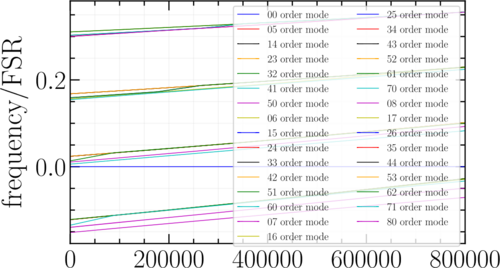
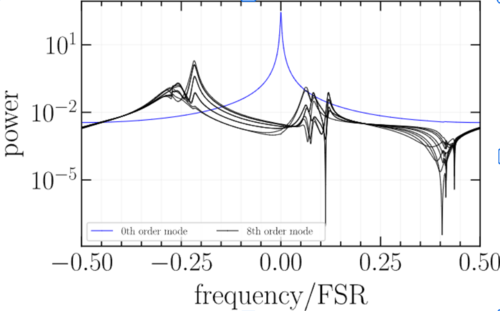
| frequency locations of 5-8th order mode across arm power of 0-800kW |
| Attachment 1: scan_5-8.png
|
|
|
711
|
Thu May 7 13:35:14 2026 |
Cynthia | Update | Interferometer Simulations | O5 Test mass |
|
| Attachment 1: Screenshot_2026-05-07_133453.png
|
|
|
714
|
Thu May 28 12:54:38 2026 |
Cynthia | Update | Interferometer Simulations | O5 Test mass |
|
| Attachment 1: 5_28_update_(1).pdf
|
.png "5_28_update_(1).pdf")
|
|
424
|
Mon Aug 12 17:09:04 2024 |
Cynthia | Update | Interferometer Simulations | O4 vs O5 cavity scans with ITM plume guess or ETM |
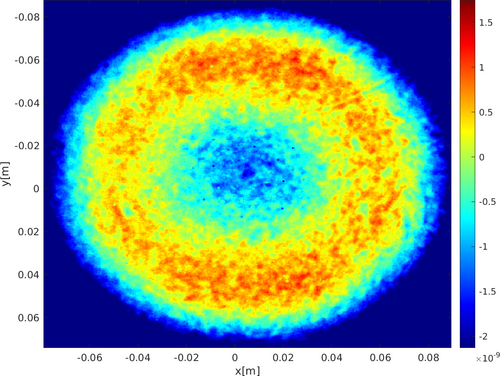
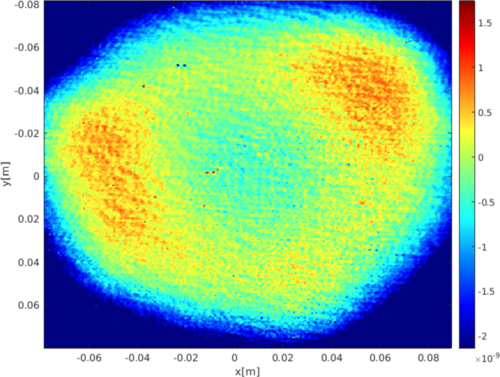
| So far the proposed solution for what to use for O5 ITM mirror for SIS simulations is either the plume guess file or using the O5 ETM mirror for ITM. I had ran a cavity scan for both of these possibilities and it seems like the results produced are fairly different. The next step is most likely moving on to adding the Frosti effects including both of the proposed possibilities, and before this, a few confirmations and verifications are needed using similar previous studies to make sure my code produce the right result. |
| Attachment 1: O5_plots_and_tables.pdf
|

|
| Attachment 2: O4_plots_and_tables.pdf
|

|
| Attachment 3: ETM12mapO5.png
|
|
| Attachment 4: Screenshot_2024-08-12_at_5.05.31_PM.png
|
|
|
392
|
Mon Jul 1 15:19:42 2024 |
Cynthia | Update | Interferometer Simulations | O4 and O5 mirror cavity scans with thermal effect |
|
| Attachment 1: cavityScan_07_01.pdf
|

|
|
578
|
Thu May 15 12:03:41 2025 |
Xuesi Ma | Infrastructure | Electronics | Notice |
All Sorensen power supplies are turned off. The Cymac system is down (All Chassis are down)
If you need more information or if you need to turn them back on please contact Xuesi Ma. |
|
67
|
Tue Apr 11 13:15:40 2023 |
Cao | Infrastructure | Clean & Bake | Nitrogen gas tank replaced |
| The nitrogen gas tank has been replaced with a new unit. The new tank is ultra pure nitrogen (>99.9% nitrogen).
The new tank has been placed and secured to the rack where the old one is; cap is removed and regulator is reinstalled onto the new tank. |
|
26
|
Fri Feb 10 16:34:45 2023 |
Huy Tuong Cao | Infrastructure | Clean & Bake | Nitrogen gas tank ready to use |
| Cao,
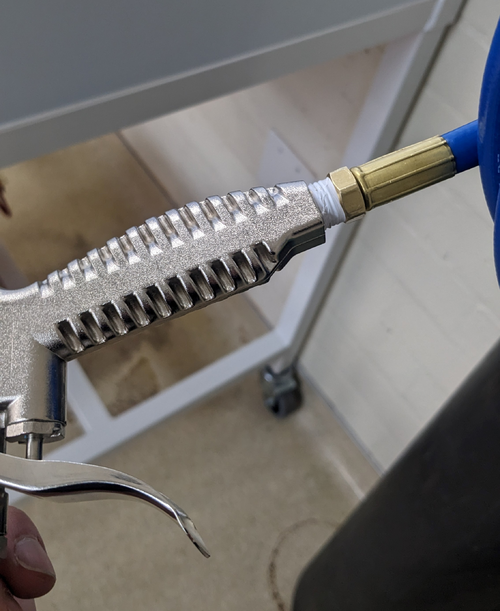
Today I fixed the final bit related to the nitrogen gas tank, which is to apply sealing tape to M-NPT connector of the hose to prevent
leakage (file: AirGunSealed.jpg)
After application of the tape, no audible leak can be heard from connection between the hose and the air gun.
The general operating procedure for the gas tank is as following:
- Turn the regulator (blue handle) anti-clockwise still it's loose
- Turn the valve on nitrogen as tank anti-clockwise, immediately the RHS meter of the regulator would jump to approx 2000 psi. This is the standard pressure for high pressure gas tank
- Turn the regulator clock-wise slowly until the pressure one the LHS meter face reads approx 60 psi. This is sufficient for drying parts with. At this point, the flow pressure still should register zero
- Press the trigger on the air gun, a high pressure air flow should come out and the flow meter should increase
- When finished, close the gas tank valve, turn the regulator anti-clockwise, then press the air gun trigger to release gas left in the hose/gun
|
| Attachment 1: AirGunSealed.jpg
|
|
|
412
|
Fri Jul 26 17:25:42 2024 |
Jon | Infrastructure | Computers | New workstation ws4 installed in 1129 |
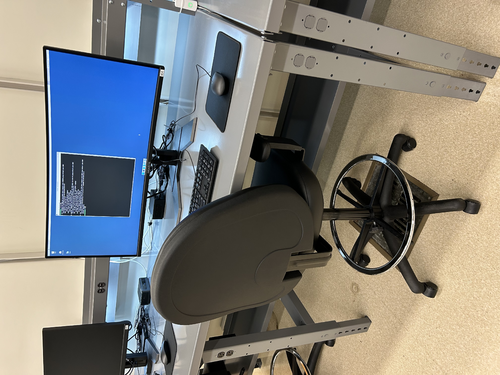
Today I installed the second desktop workstation in 1129. The new machine is an Intel NUC13ANHi5, with a 12-Core Intel i5-1340P CPU, 32GB DDR4 RAM, and a 1TB SSD.
I loaded it with a fresh installation of Debian 12 and installed the LIGO CDS workstation (control room) tools. It is assigned the hostname ws4 and and the static IP address 192.168.1.19 on the local lab network. Like the other CDS workstations, there is just one user account accessible with the usual credentials.
The machine is fully set up and ready for use. |
| Attachment 1: ws4.jpg
|
|
|
379
|
Thu Jun 20 18:01:11 2024 |
Jon | Infrastructure | Computers | New workstation ws3 in 1129 |
| I have repurposed a spare Intel NUC to serve as the first of two planned workstations in 1129. Today I set it up with a fresh installation of Debian 12.5, assigned it the static IP address 192.168.1.15, and installed the LIGO CDS workstation packages. It is assigned the host name ws3.
Temporarily, the mouse is borrowed from ws1 in 1119. We need to order another mouse as well as a 25-ft Ethernet cable for connecting the workstation to the 1129 switch, via the ceiling. |
|
385
|
Wed Jun 26 15:33:41 2024 |
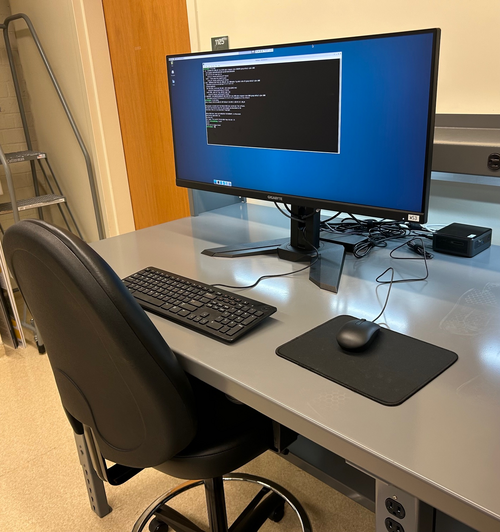
Jon | Infrastructure | Computers | New workstation ws3 in 1129 |
Set-up of the first CDS workstation for 1129, ws3, is complete and the machine is ready for use. The login credentials are the same as the other lab machines.
All that now remains is to install a permanent cable tray for running the new Ethernet cables between the electronics rack and bench (they are currently dangling from the suspended lights).
| Quote: |
| I have repurposed a spare Intel NUC to serve as the first of two planned workstations in 1129. Today I set it up with a fresh installation of Debian 12.5, assigned it the static IP address 192.168.1.15, and installed the LIGO CDS workstation packages. It is assigned the host name ws3.
Temporarily, the mouse is borrowed from ws1 in 1119. We need to order another mouse as well as a 25-ft Ethernet cable for connecting the workstation to the 1129 switch, via the ceiling. |
|
| Attachment 1: IMG_1368.jpg
|
|
|
198
|
Wed Aug 9 11:32:56 2023 |
Jon | Infrastructure | General | New power cables |
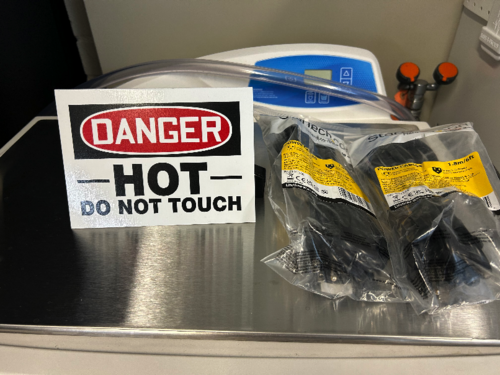
I delivered new NEMA 5-15 (120V / 15 A) power cables to the lab for the following items:
- WS2 (cleanroom) cart - 10ft cable
- Electronics workbench overhead LED - 10ft cable
- Both PI heater controller sets - (2) 6ft cables
I installed the new cables on the WS2 cart and the workbench myself, and left the two 6ft cables (as pictured below) for Aiden to install on the PID controllers after the current bake is finished. |
| Attachment 1: IMG_0299.jpg
|
|
|
562
|
Fri Apr 25 19:18:10 2025 |
Luke | Update | Scripts/Programs | New optimization plots |
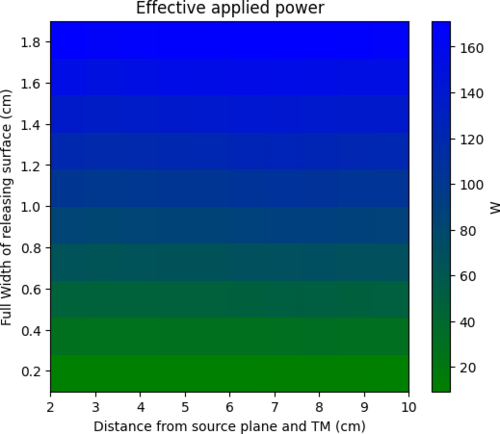
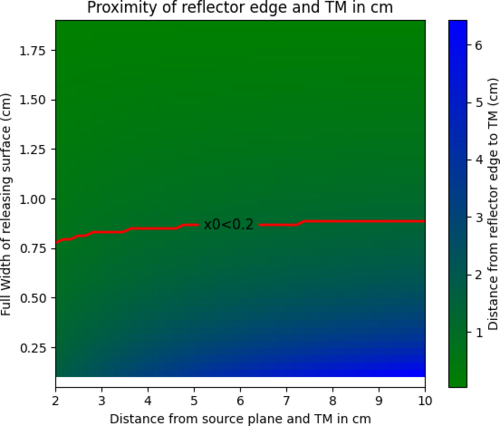
I have created two more plots. One on the transmitted power for a specific configuration. This was done by taking the product of the efficiency and the power released by surface area of the source plane for a configuration assuming it is at 300C. The second is a plot of how close the reflector is to the test mass I have included a contour line at 2mm the nominal proximity constraint. Both of these plots are generated for a 2cm wide target plane.
Somethings of note: Because the proximity requires no modeling and can be determined purely mathematically it is easy to re-generate this plot of other target widths. If you increase the target width the proximity contour moves upward and downwards if reduced. |
| Attachment 1: effective_power.png
|
|
| Attachment 2: proximity.png
|
|
|
575
|
Sun May 11 19:36:42 2025 |
Luke | Update | Scripts/Programs | New optimization plots |
Slides
I have re-run the optimization plots with the changes mentioned last week.
I have added the heat maps of the HOM scattering from HR deformation and the HOM scattering due to the OPD difference as well as the curvature actuation of the surface. |
|
640
|
Tue Sep 2 18:33:38 2025 |
Liu | Infrastructure | General | New lab room 1125 layout and measurement |
Action items for facilities
- Ceiling lights replacement
- Fume hood cleaned and refurbished
- Sink countertop cleaning
- Floor cleaned and waxed
-
|
| Attachment 1: 1125.pdf
|

|